2026-07-24
Standalone ChromaDB for RAG in Open WebUI
Our earlier RAG proof-of-concept used Open WebUI's embedded vector store — invisible, zero-config, and already backed by ChromaDB under the hood (confirmed on our own box: Open WebUI 0.x ships ChromaDB 1.5.9 and persists it to /app/backend/data/vector_db/chroma.sqlite3 inside the container). This doc goes one level deeper: we run ChromaDB as its own standalone server, point Open WebUI at it over HTTP instead of the embedded file store, and prove retrieval is grounded by querying the vector database directly — not just trusting Open WebUI's citation UI.
Why bother, if the embedded store already works? Because a standalone server is what a real deployment looks like: the vector DB becomes an inspectable, independently running service with its own port and API, which other apps could share, which you can back up separately, and which you can query yourself to see exactly what got embedded — instead of a hidden SQLite file inside a container.
open-webuicontainer uses. Knowledge collections already embedded in the old, embedded store will not automatically appear once you point Open WebUI at the new external Chroma server — you'll be starting that collection fresh. Do this as a deliberate demo, not an accidental switch on a box other people are using mid-class. If you want to keep the old embedded data reachable later, note that it stays on disk in the open-webuiDocker volume untouched — you're not deleting anything, just changing where new collections get written.1. Confirm the environment
On the HP workstation (192.168.1.92), Open WebUI already runs as a Docker container named open-webui with --network host, serving the UI on :8080. llama-server is already using :8001 for inference, so port :8000is free — that's what we'll give the standalone Chroma server.
ssh jay@192.168.1.92

# sanity check — confirm 8000 is free and docker is present
sudo ss -tlnp | grep -E ':(8000|8001|8080)'
docker ps -a/etc/systemd/system/open-webui.service, Restart=always). Worth knowing going in: on our box that unit's ExecStarthas drifted from the container that's actually been running for days (someone docker run -d'd it by hand at some point), so systemd has been silently crash-looping in the background trying to recreate a container named open-webui that already exists — check with systemctl status open-webui.service(look for a large "restart counter") and journalctl -u open-webui.service -n 20. Harmless — the real container never goes down — but it means the unit file, not a manual docker run, is the safe place to change how Open WebUI starts, since anything done by hand will fight the next auto-restart.2. Run ChromaDB as its own container
Pull the official Chroma server image, then set it up as a systemd service right away — every other service on this box (llama-inference-*, open-webui) is systemd-managed with Restart=always, and a plain docker run -d has no restart policy of its own, so it would not survive a reboot. Skip the ad-hoc container entirely and go straight to the unit file:
sudo docker pull chromadb/chroma--network host (in the unit below) matches how open-webui is already running, so both containers can reach each other over localhost without extra Docker networking.
sudo tee /etc/systemd/system/chromadb.service > /dev/null <<'EOF'
[Unit]
Description=ChromaDB vector database
After=network.target docker.service
Requires=docker.service

[Service]
Type=simple
User=jay
ExecStartPre=-/usr/bin/docker rm -f chromadb
ExecStart=/usr/bin/docker run \
  --network=host \
  -v chroma-data:/data \
  -e IS_PERSISTENT=TRUE \
  -e ANONYMIZED_TELEMETRY=FALSE \
  --name chromadb \
  chromadb/chroma
ExecStop=/usr/bin/docker stop chromadb
Restart=always
RestartSec=10

[Install]
WantedBy=multi-user.target
EOF

sudo systemctl daemon-reload
sudo systemctl enable --now chromadb.service
systemctl status chromadb.service --no-pagerReal output from our run:
● chromadb.service - ChromaDB vector database
     Loaded: loaded (/etc/systemd/system/chromadb.service; enabled; vendor preset: enabled)
     Active: active (running) since Fri 2026-07-24 18:03:13 MDT; 2s ago
    Process: 505663 ExecStartPre=/usr/bin/docker rm -f chromadb (code=exited, status=0/SUCCESS)
   Main PID: 505673 (docker)
             └─505673 /usr/bin/docker run --network=host -v chroma-data:/data ... chromadb/chroma

Jul 24 18:03:13 jay-z820 docker[505673]: Saving data to: /data
Jul 24 18:03:13 jay-z820 docker[505673]: Connect to Chroma at: http://localhost:8000
Jul 24 18:03:13 jay-z820 docker[505673]: No telemetry is configured.

$ curl -s http://localhost:8000/api/v2/heartbeat
{"nanosecond heartbeat":1784937795495001733}enabled + active (running)confirms it'll now survive a reboot on its own.
ExecStartPre=-/usr/bin/docker rm -f chromadb (the leading -means "ignore failure") clears out any stale container left over from a crash before each start, same defensive pattern worth carrying into open-webui.service too — it would have prevented the name-conflict crash-loop from step 1.
llama-inference-phi-2.service is also configured for port 8000, the same port ChromaDB just claimed. It's currently disabled, so there's no conflict today — just don't enable that particular unit without first moving one of the two off port 8000.3. Verify the Chroma server is up
curl -s http://localhost:8000/api/v2/heartbeat
sudo docker logs chromadb --tail 20Real output from our run:
$ curl -s http://localhost:8000/api/v2/heartbeat
{"nanosecond heartbeat":1784936784061533814}

$ sudo docker logs chromadb --tail 20
Saving data to: /data
Connect to Chroma at: http://localhost:8000
Getting started guide: https://docs.trychroma.com/docs/overview/getting-started
No telemetry is configured.4. Point Open WebUI at the external Chroma server
Open WebUI defaults to an embedded, file-backed Chroma client when VECTOR_DB is unset. Setting VECTOR_DB=chroma plus the CHROMA_HTTP_* variables switches it to talk to our standalone server over HTTP instead. Because the service is systemd-managed with Restart=always, add the env vars to the unit file's ExecStartrather than replacing the container by hand — that way systemd's own restart logic (including the pre-existing crash-loop from step 1) ends up recreating the container with the right config instead of fighting it.
sudo systemctl stop open-webui.service
sudo docker rm -f open-webui   # the currently-running container, now stopped by the line above

sudo vi /etc/systemd/system/open-webui.serviceOnly the ExecStart line inside [Service] needs to change — add the three CHROMA_HTTP_* flags and VECTOR_DB=chroma, and leave OLLAMA_BASE_URLalone (it's unrelated to this change). Everything else in the file, including the [Unit] and [Install]sections, stays exactly as it was — don't delete those lines, only edit inside [Service]. The full file should look like this afterward:
[Unit]
Description=Open WebUI
After=network.target docker.service llama-inference.service llama-inference-2.service
Requires=docker.service

[Service]
Type=simple
User=jay
ExecStart=/usr/bin/docker run \
  --network=host \
  -v open-webui:/app/backend/data \
  -e OLLAMA_BASE_URL=http://127.0.0.1:8000 \
  -e VECTOR_DB=chroma \
  -e CHROMA_HTTP_HOST=localhost \
  -e CHROMA_HTTP_PORT=8000 \
  -e CHROMA_HTTP_SSL=false \
  --name open-webui \
  ghcr.io/open-webui/open-webui:main
ExecStop=/usr/bin/docker stop open-webui
Restart=always
RestartSec=10

[Install]
WantedBy=multi-user.targetsudo systemctl daemon-reload
sudo systemctl start open-webui.service
# confirm it's actually healthy this time, not crash-looping
sudo systemctl status open-webui.service --no-pager
sudo docker logs -f open-webuiReal output from our run:
● open-webui.service - Open WebUI
     Loaded: loaded (/etc/systemd/system/open-webui.service; enabled; vendor preset: enabled)
     Active: active (running) since Fri 2026-07-24 18:24:16 MDT; 20ms ago
   Main PID: 507966 (docker)
     CGroup: /system.slice/open-webui.service
             └─507966 /usr/bin/docker run --network=host -v open-webui:/app/backend/data
                       -e OLLAMA_BASE_URL=http://127.0.0.1:8000 -e VECTOR_DB=chroma -e CHROMA_…

Jul 24 18:24:16 jay-z820 systemd[1]: Started Open WebUI.

$ sudo docker logs -f open-webui
INFO  [alembic.runtime.migration] Context impl SQLiteImpl.
v0.10.2 - building the best AI user interface.
INFO:     Started server process [1]
INFO:     Waiting for application startup.
2026-07-25 00:24:37 | INFO | sentence_transformers...: Loading SentenceTransformer model
2026-07-25 00:24:38.786 | INFO | ... "GET /api/version HTTP/1.1" 200The -v open-webui:/app/backend/data volume is unchanged, so chats, users, and settings are preserved — only the vector store backend changes.
OLLAMA_BASE_URL still points at 127.0.0.1:8000— previously stale/unused (nothing was listening there), now the same port ChromaDB is on. In practice this is harmless: Open WebUI's Ollama client only ever calls Ollama-specific endpoints (/api/tags, etc.), which the Chroma server just 404s on, so it doesn't corrupt anything — but it's worth eventually pointing at wherever your real model connection actually lives and cleaning up the stale value.5. Download the sample documents
Three short documents, three different formats, each containing a specific, made-up fact no LLM could already know — the same "implausible claim" trick as before, across a .txt, a .md, and a real .pdf this time:
- saturdai-hardware-support-policy.txt — a fictional 47-day laptop exchange policy for cohort "Q" students.
- larkspur-aquifer-study.md — a fictional 2024 groundwater study with specific numbers (3.2 cm/year recharge, 118 wells, a named lead researcher).
- falcon-x200-spec.pdf — a fictional drone spec sheet (14,700 mAh battery, 63-minute flight time, FalconLink wireless protocol).
6. Create a knowledge collection and upload all three
In Open WebUI: Workspace → Knowledge → + Create new knowledge, name it ChromaDB RAG POC, then upload all three sample files and wait for indexing to finish on each.
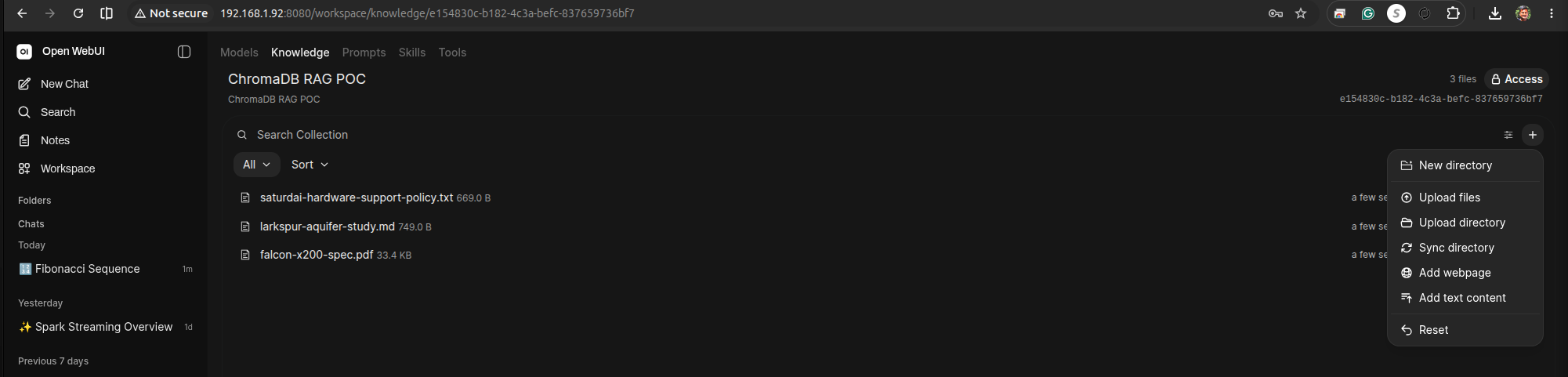
7. Prove the data actually lives in the external Chroma server
This is the step the embedded setup couldn't give us: query the vector database directly, outside of Open WebUI entirely, and see the uploaded chunks sitting in it.
pip3 install chromadb --quiet
python3 <<'PY'
import chromadb
client = chromadb.HttpClient(host="localhost", port=8000)
for c in client.list_collections():
    print(c.name, "->", c.count(), "chunks")
PYReal output from our run:
e154830c-b182-4c3a-befc-837659736bf7 -> 4 chunks
knowledge-bases -> 1 chunks
file-da68479f-41b2-4127-ba9c-ca5049f38e91 -> 1 chunks
file-072b5c0d-956a-4e47-9ad6-b8fdb16c5728 -> 2 chunks
file-d3de1e5c-5cfe-4fcf-b3c6-8cb7217d0714 -> 1 chunkse154830c-b182-4c3a-befc-837659736bf7is the "ChromaDB RAG POC" collection's internal ID (matches the URL in the screenshot above) — 4 chunks across the three uploaded files. The file-*collections are Open WebUI's per-file working stores; knowledge-bases is its internal bookkeeping collection. Every one of these lives in the standalone Chroma server we stood up in step 2, not some opaque file inside the Open WebUI container.
8. Compare answers with and without retrieval, per document
For each fact below, ask the question in a fresh chat with noknowledge attached first (expect a generic/hedging or "I don't know" answer), then type #, attach ChromaDB RAG POC, and ask again:
- "How many days does a SaturdAI cohort-Q student have to exchange their laptop?" → grounded answer should say 47 days and reference code SDX-4471.
- "What was the recharge rate in the Larkspur Aquifer study?" → grounded answer should say 3.2 cm/year and name Dr. Elena Voskresenskaya.
- "What's the max flight time of the Falcon X200?" → grounded answer should say 63 minutes and mention the FalconLink protocol.
Confirm each grounded answer carries a "Retrieved N source(s)" badge and that expanding the citation points at the correct file (.txt, .md, or .pdfrespectively) — showing Open WebUI's PDF loader extracted the table correctly, not just the plain-text files.
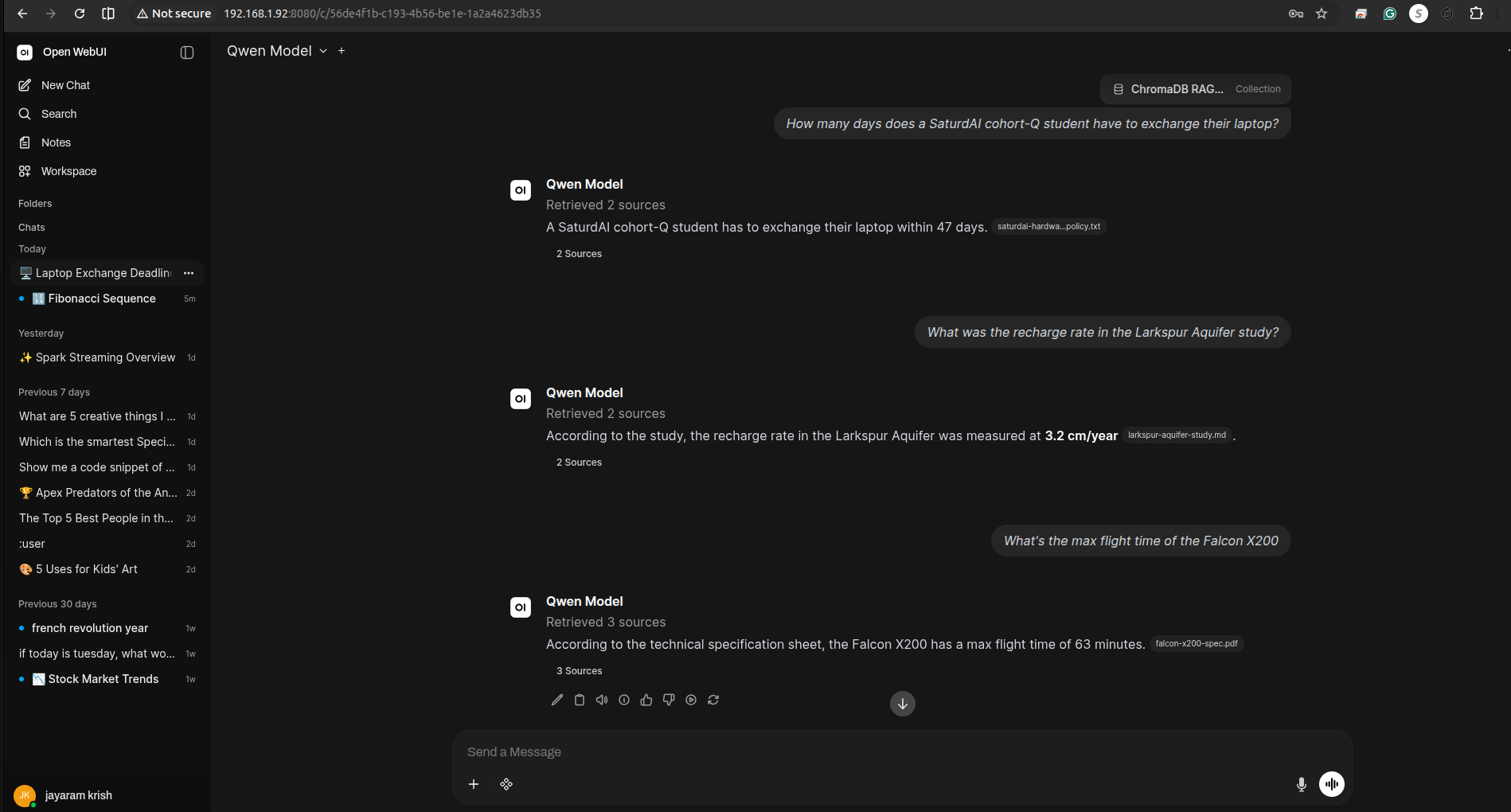
Real answers from our run — note the model doesn't always surface every specific detail (it skipped the SDX-4471reference code and Dr. Voskresenskaya's name), which is normal: the retrieval and citation are what prove groundedness, not word-for-word recall of every fact in the chunk.
Q: How many days does a SaturdAI cohort-Q student have to exchange their laptop?
A: A SaturdAI cohort-Q student has to exchange their laptop within 47 days.
   [Retrieved 2 sources — saturdai-hardwa...policy.txt]

Q: What was the recharge rate in the Larkspur Aquifer study?
A: According to the study, the recharge rate in the Larkspur Aquifer was measured
   at 3.2 cm/year. [Retrieved 2 sources — larkspur-aquifer-study.md]

Q: What's the max flight time of the Falcon X200?
A: According to the technical specification sheet, the Falcon X200 has a max
flight time of 63 minutes. [Retrieved 3 sources — falcon-x200-spec.pdf]SDX-4471 or a named researcher like Dr. Voskresenskaya. Second, we independently confirmed via the Python chromadb client, talking straight to port 8000, that the chunks are physically present in the standalone vector database — not just trusting what Open WebUI's citation UI claims.9. Make the knowledge collection attach automatically
So far every question required typing # and picking ChromaDB RAG POC by hand. For a classroom demo (or any real use), attach the collection to a model instead of a chat, so retrieval happens automatically — no student choice required.
Go to Workspace → Models → + Create a new model, pick a base model (e.g. Qwen Model), give it a name like Qwen + ChromaDB RAG POC, and in the Knowledge section of the editor add ChromaDB RAG POC. Save.
Start a new chat, select this custom model instead of the base one, and ask any of the three questions from step 8 with no # attach step — it retrieves from the collection automatically every time.
Qwen Model, and a student who picks the base model instead still gets no retrieval. For a class demo, just make sure everyone is pointed at the custom model (e.g. set it as the default in Admin Panel → Settings → Models) rather than relying on students to attach knowledge manually.What this demonstrates
RAG in Open WebUI is not magic tied to the app itself — it's a standard pipeline (embed → store in a vector DB → similarity search → inject into the prompt → cite) that can point at any Chroma-compatible backend. Running ChromaDB as its own service makes every stage of that pipeline inspectable: you can watch the container logs, curl its API, and query it with a five-line Python script, which is exactly the kind of infrastructure literacy worth building before reaching for a managed vector database in production.
Appendix: Tear down ChromaDB and reset for a fresh run
To run this whole doc again from a clean slate — e.g. right before class — remove only the ChromaDB service, container, and its data volume. Open WebUI itself is left completely alone: its unit file, container, and volume are untouched.
sudo systemctl disable --now chromadb.service
sudo docker rm -f chromadb 2>/dev/null   # in case a container lingered outside systemd
sudo rm /etc/systemd/system/chromadb.service
sudo systemctl daemon-reload
sudo docker volume rm chroma-dataConfirm it's actually gone:
systemctl status chromadb.service    # "could not be found"
docker ps -a | grep chromadb          # no output
docker volume ls | grep chroma-data   # no output
sudo ss -tlnp | grep :8000 # nothing listeningchroma-data volume wipes the vectors, but the ChromaDB RAG POC collection entry still exists in Open WebUI's own database (a separate volume, open-webui, which you're keeping) and will now point at nothing. Go to Workspace → Knowledge, open ChromaDB RAG POC, and delete it from the ⋯menu before re-running step 6 — otherwise you'll end up with a second, differently-named collection instead of a clean re-creation.Open WebUI's open-webui.service still has VECTOR_DB=chroma and CHROMA_HTTP_PORT=8000pointed at the (now torn-down) standalone server — that's expected and fine to leave as-is per this doc's step 4. Knowledge/RAG features just won't work until step 2 is redone and chromadb.service is back up; regular chat with the models is unaffected the whole time. To get back to a working demo, re-run this doc starting at step 2(the image is already pulled locally, so it's fast) through step 8.
Case study: CPKC (real-world documents)
Everything above used three small, fictional sample files — perfect for proving the pipeline works, but not proof it works on the messy documents a real organization actually has lying around. For this case study we swapped in two real, public PDFs from CPKC (Canadian Pacific Kansas City), the freight railroad formed by the 2023 CP–Kansas City Southern merger — downloaded directly from CPKC's own investor site, not written for this demo:
- cpkc-2024-sustainability-data-report.pdf — CPKC's 2024 Sustainability Data Report, 2.3MB of dense ESG tables (safety, emissions, workforce metrics).
- cpkc-investor-presentation-jun2025.pdf — CPKC's June 2025 investor presentation, a 36-page, 8.9MB slide deck with financial highlights and network stats.
cpkcr.com) sits behind a Cloudflare bot challenge that blocks a plain curl — the direct PDF URLs (cpkcr.com/content/dam/... and its investor-relations CDN at q4cdn.com) had to be found via search instead of crawling the site itself.Same knowledge-collection workflow, real files
Created a second collection, CPKC Case Study, and uploaded both PDFs the same way as before (Workspace → Knowledge → + Create new knowledge):
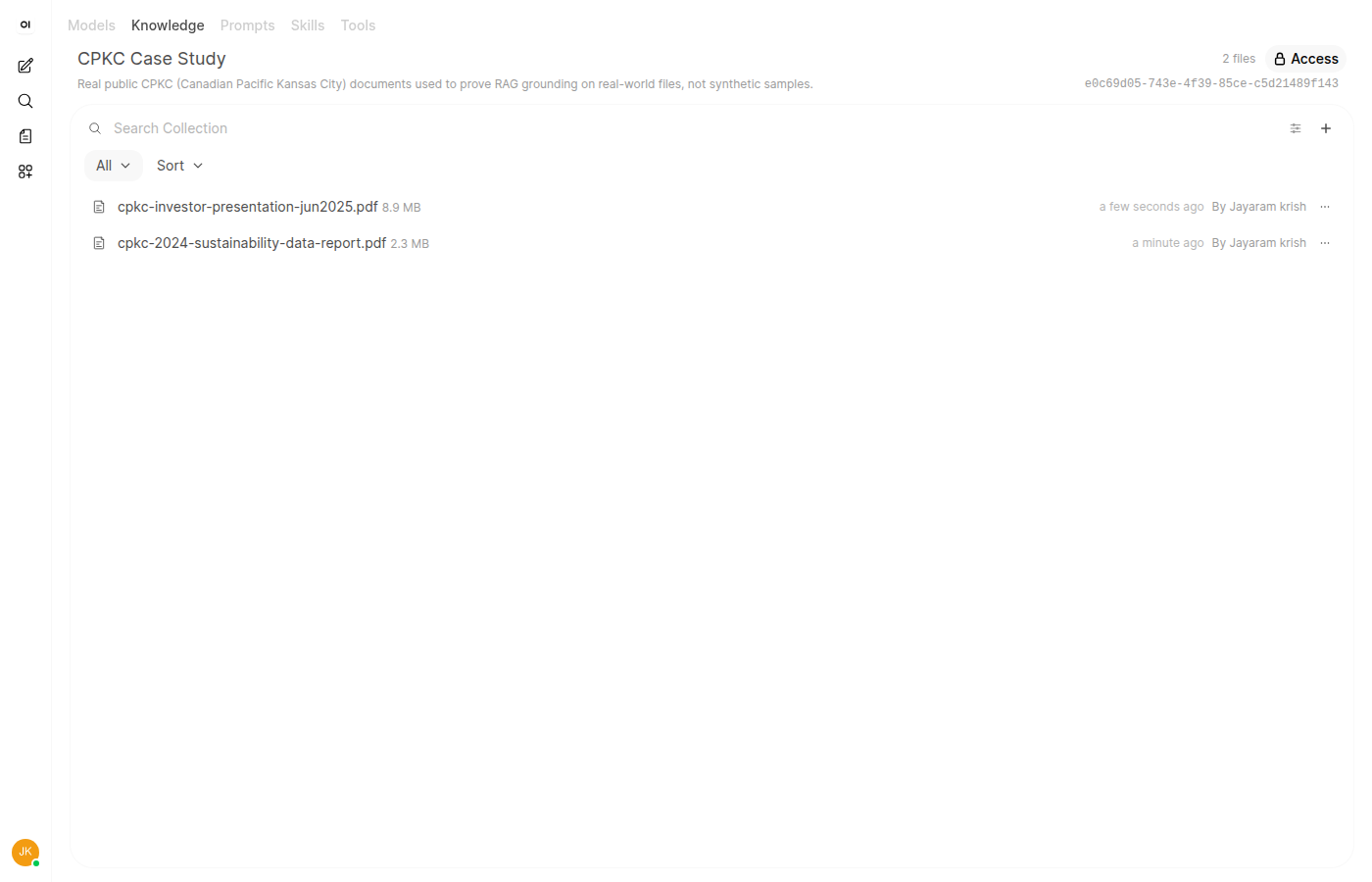
Confirmed directly against the standalone Chroma server, same as before:
python3 -c "
import chromadb
client = chromadb.HttpClient(host='192.168.1.92', port=8000)
for c in client.list_collections():
    print(c.name, '->', c.count(), 'chunks')
"e0c69d05-743e-4f39-85ce-c5d21489f143 -> 204 chunks # "CPKC Case Study"
file-0aefb7e3-7201-4cf1-bc3e-60e28fd12f39 -> 65 chunks # sustainability report
file-b46cb365-5788-4387-972c-8513e0a6fcef -> 139 chunks # investor presentationThree real questions, three different outcomes
Unlike the synthetic docs, these numbers are genuinely obscure — nobody has an LLM-known opinion on CPKC's FRA injury rate — so instead of an "implausible claim" test, we asked specific factual questions with the CPKC Case Study collection attached via #, and compared each answer against the source PDF ourselves. The results were not uniformly good, which is the more honest lesson:
1. A clean win."What was CPKC's FRA Personal Injury Rate Frequency in 2024?" retrieved the right row from the right table and answered correctly:
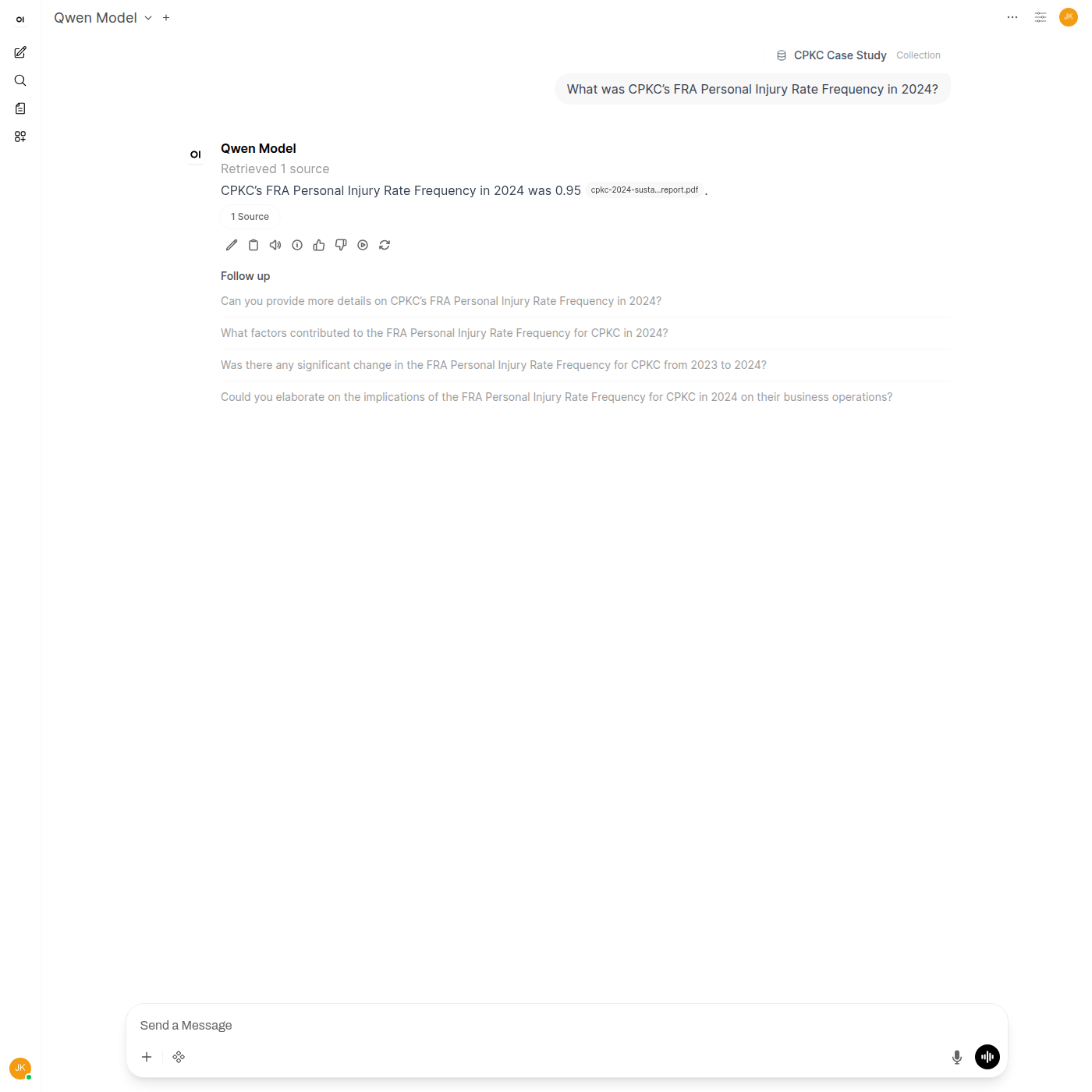
2. A retrieval miss."What was CPKC's operating ratio as reported for Q1 2025?" is answered plainly in the investor presentation (64.4%, down from 65.0% a year earlier) — but the model reported it couldn't find it, despite retrieving 2 sources:
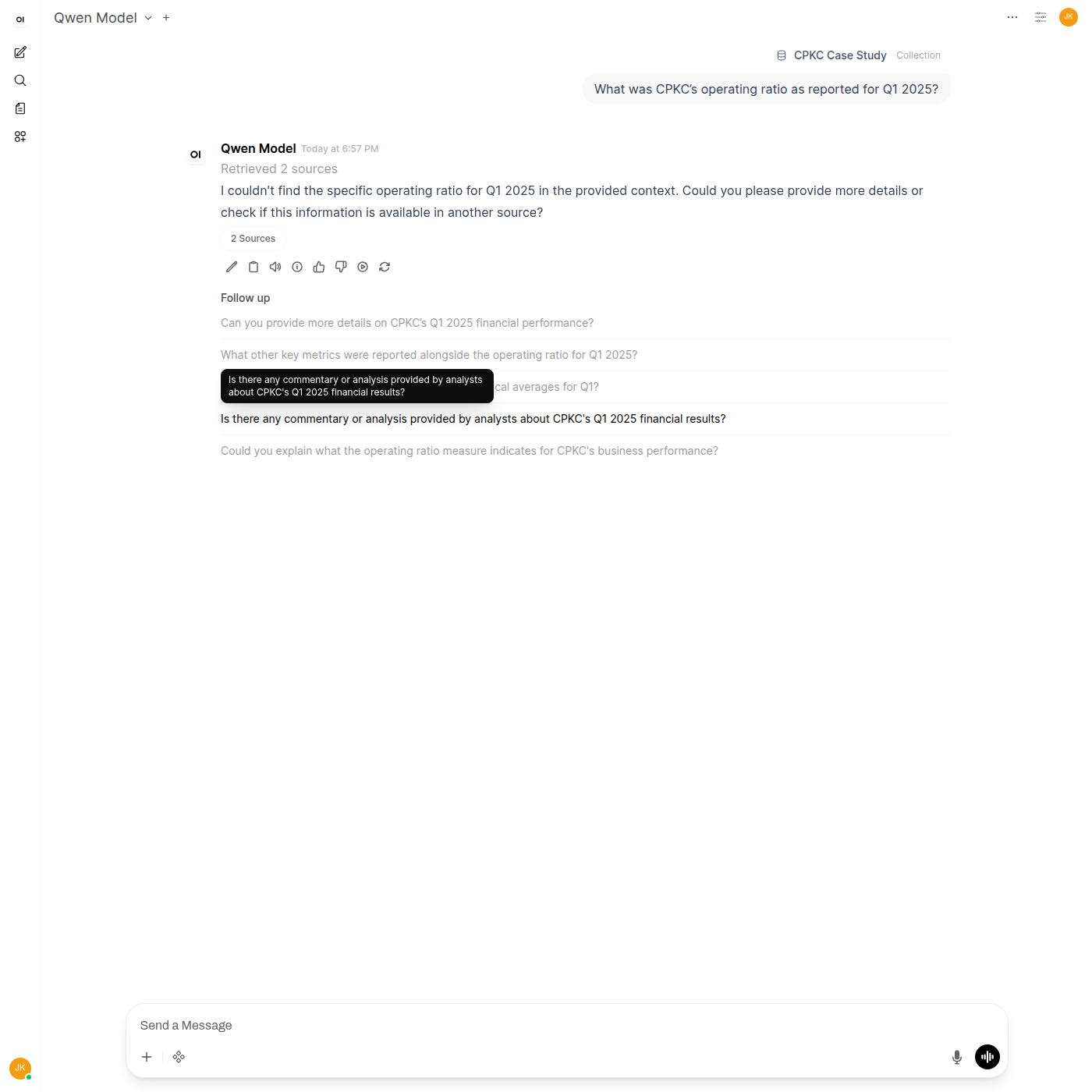
Likely cause: PDF chunking works on extracted text, and a 36-page slide deck packs numbers into dense tables and multi-column layouts that don't extract cleanly into contiguous, semantically-searchable text the way prose does. The chunk containing 64.4% either got split away from its "operating ratio" label or never scored as the closest match for this phrasing of the question.
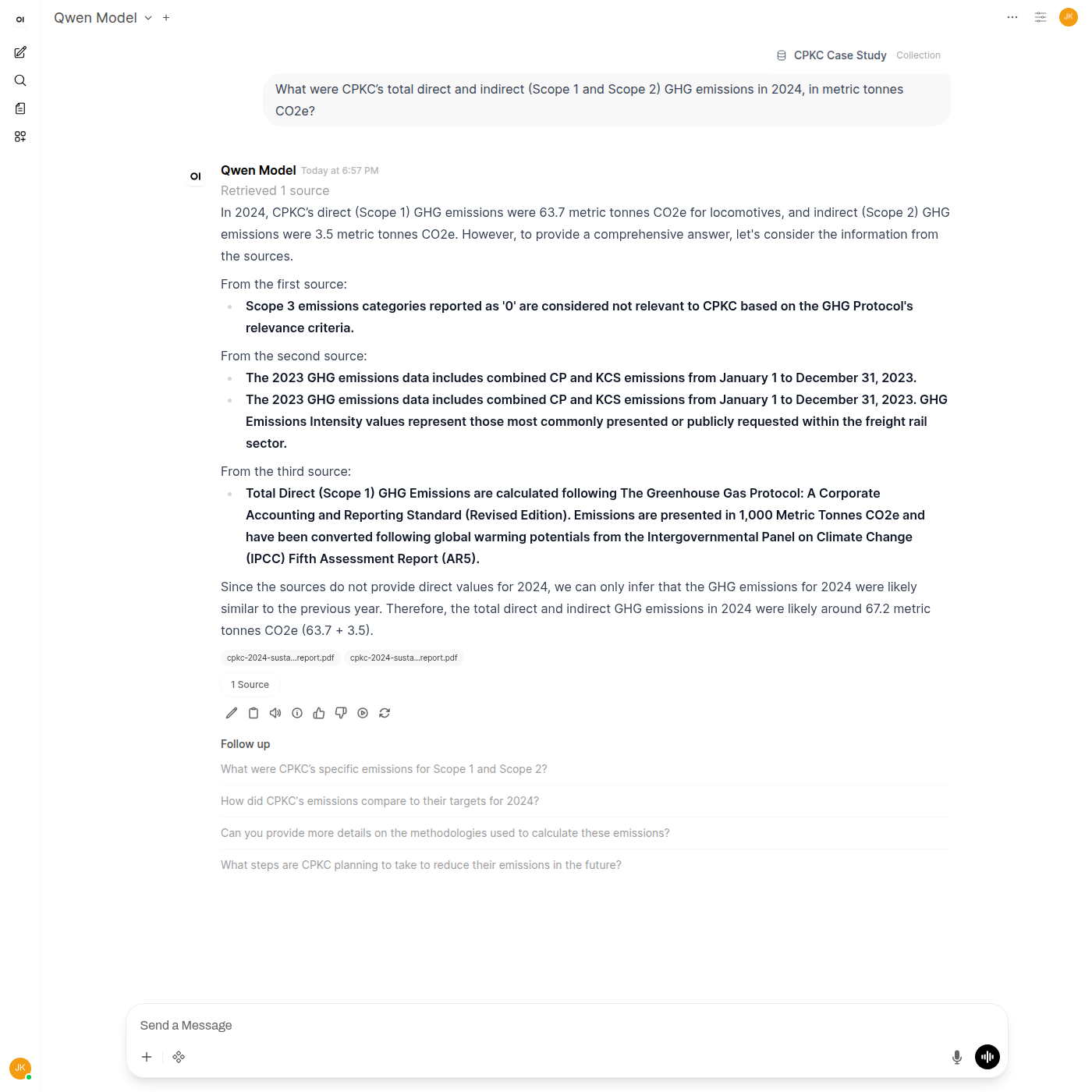
3. Confidently wrong."What were CPKC's total direct and indirect (Scope 1 and Scope 2) GHG emissions in 2024, in metric tonnes CO2e?" is the most instructive failure of the three — the model retrieved real numbers from the real document, then reasoned its way to the wrong answer:
What this case study demonstrates
The synthetic-document tests earlier in this doc prove the RAG plumbingworks end to end. Real corporate PDFs prove something the synthetic tests can't: that retrieval quality depends heavily on how cleanly a document's text extracts, and that a citation is not the same thing as a correct answer. A wrong number pulled from the right file, with a source badge attached, is more dangerous than an obvious "I don't know" — it looks grounded. The practical takeaway for anyone building RAG on real internal documents: dense tables and slide decks need either better chunking (table-aware extraction, smaller chunk sizes around numeric data) or a verification step, because "it cited a source" is necessary but not sufficient proof of a correct answer.
Exercise: Does a smaller chunk size fix the CPKC misses?
The case study above diagnosed two failures — the missed operating ratio and the wrong GHG total — as likely chunking problems: dense tables don't extract into clean, contiguous prose, so a label and its number can end up in different chunks, or in the same chunk as an unrelated row. This exercise tests that hypothesis directly instead of just asserting it.
1. Check the current chunk settings
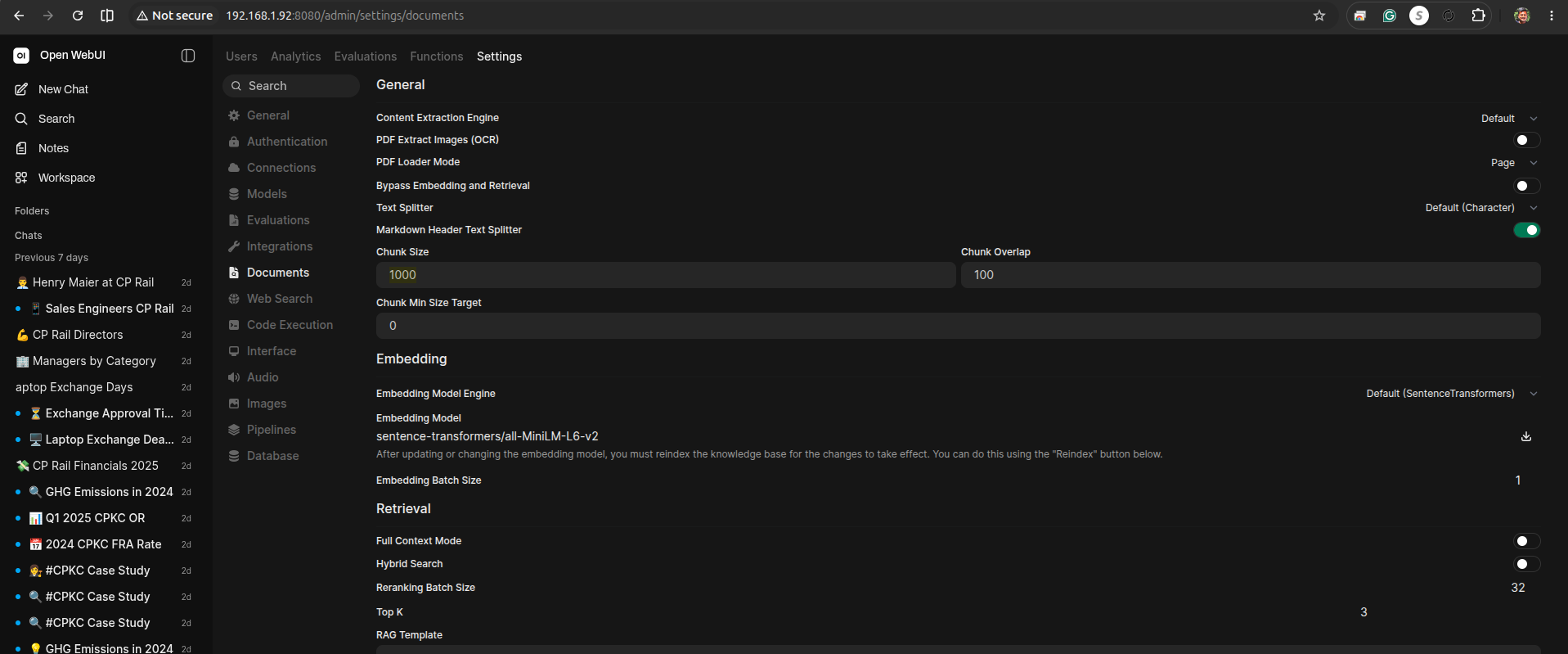
Admin Panel → Settings → Documents. Note the current Chunk Size and Chunk Overlap (Open WebUI ships with 1000 / 100 by default).
2. Lower the chunk size and re-ingest into a new collection
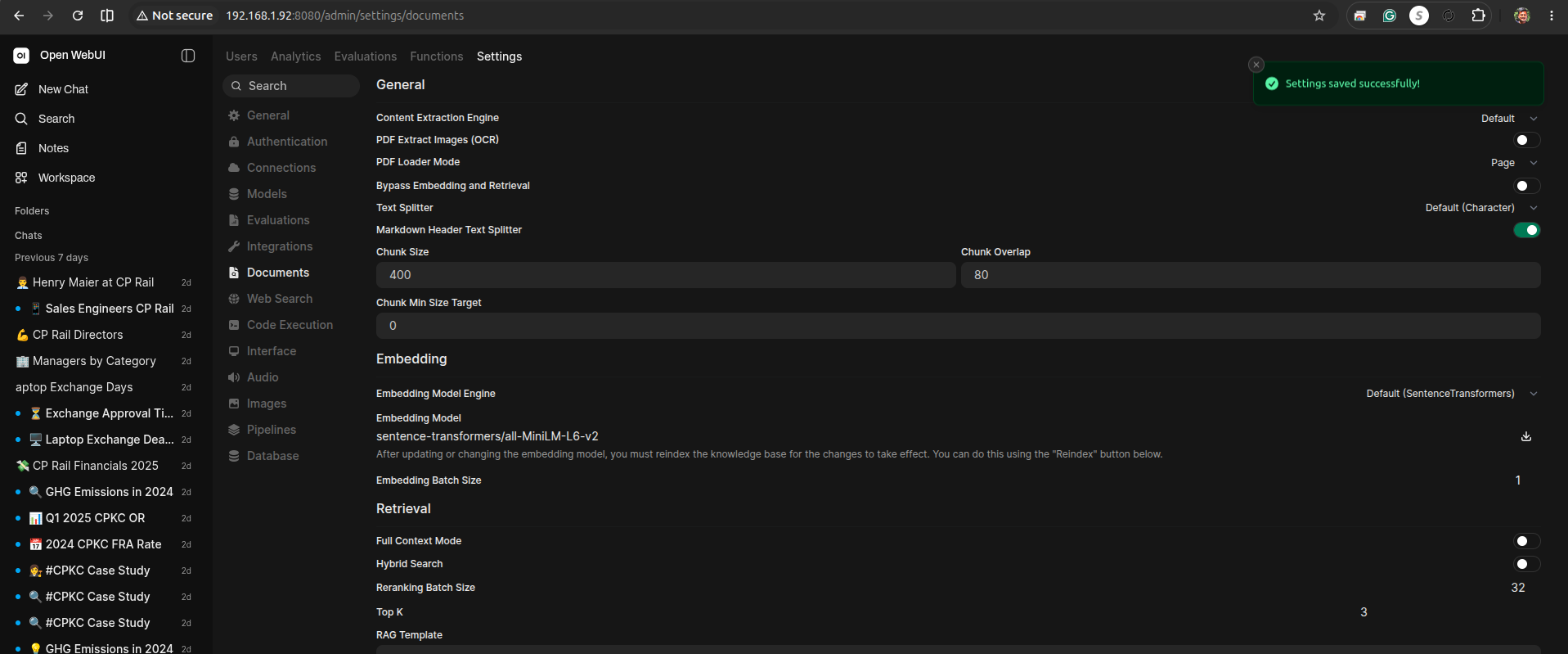
Chunk settings only apply at upload time — existing collections keep their original chunks. Set Chunk Size to 400 and Chunk Overlap to 80, save, then create a new knowledge collection (Chroma POC - Jul 27) and upload the same two CPKC PDFs from case-study-samples/ again.
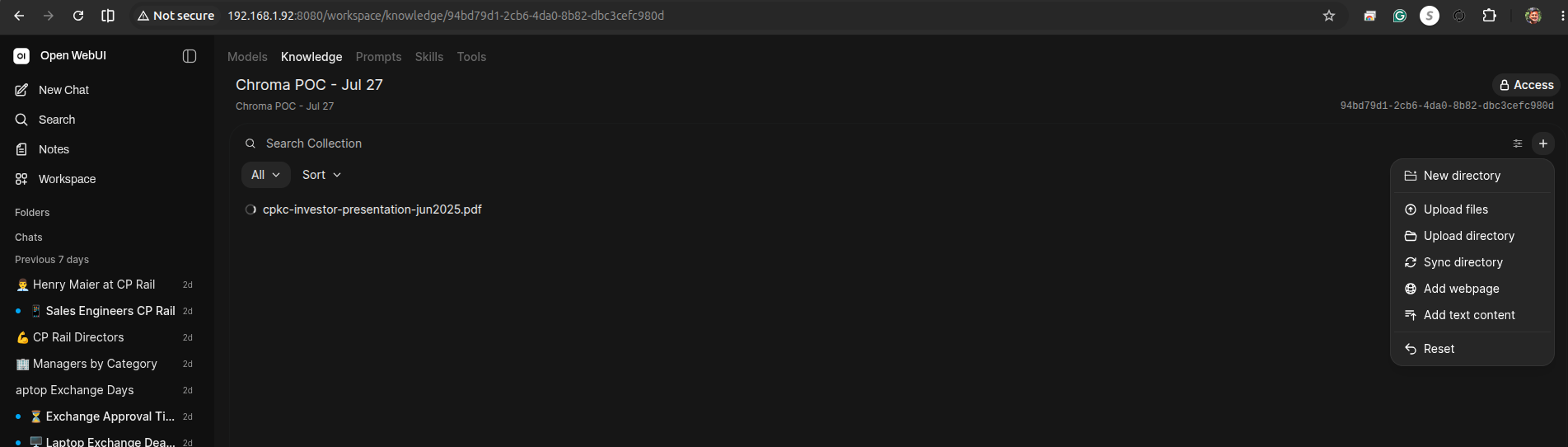
3. Confirm the chunk count actually changed
Same direct-to-Chroma check as before, now against the new collection:
python3 chroma.py
# chroma.py:
#   import chromadb
#   client = chromadb.HttpClient(host="localhost", port=8000)
#   for c in client.list_collections():
# print(c.name, "->", c.count(), "chunks")94bd79d1-2cb6-4da0-8b82-dbc3cefc980d -> 510 chunks # "Chroma POC - Jul 27"
file-4c669c60-a8d1-452b-a952-f42048277a0c -> 349 chunks # investor presentation (was 139)
file-853f5f34-4a23-4600-8b05-ae49c94a76c2 -> 161 chunks # sustainability report (was 65)Both files landed almost exactly 2.5× more chunks — consistent with dropping chunk size from 1000 to 400 (also a 2.5× reduction). 204 total chunks became 510.
4. Re-ask the two documented failures
With the new collection attached via #:
- "What was CPKC's operating ratio as reported for Q1 2025?" — real answer 64.4%.
- "What were CPKC's total Scope 1 and Scope 2 GHG emissions in 2024, in metric tonnes CO2e?" — real answer 4,705.0 thousand metric tonnes CO2e.
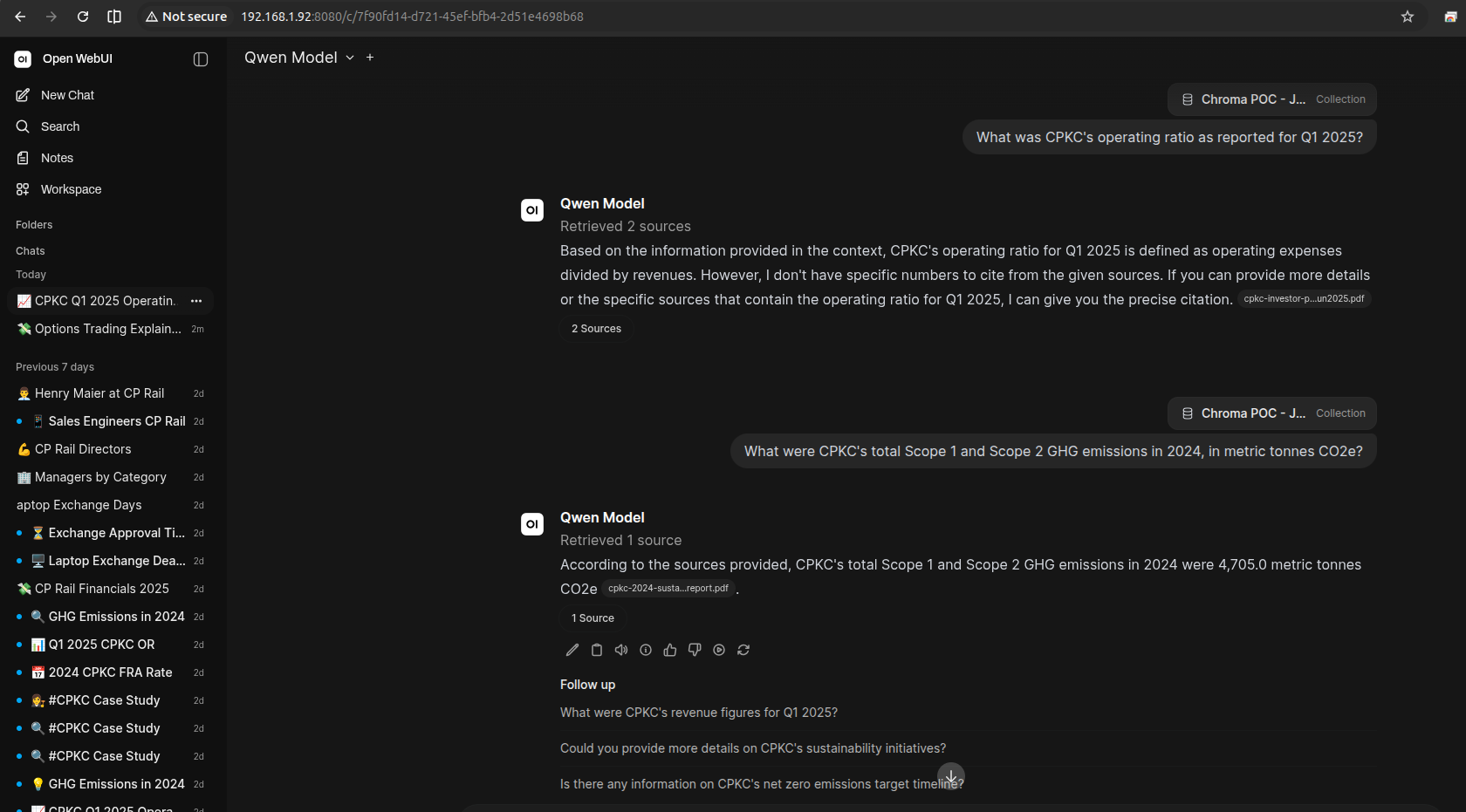
- GHG emissions (Q3): fixed. Previously the model confidently added two mismatched line items (63.7 + 3.5 ≈ 67.2, a completely wrong figure) and cited it as fact. At chunk size 400 it now answers 4,705.0 metric tonnes CO2e, matching the real total — smaller chunks kept the Scope 1/2 total row separate from the unrelated biogenic emissions rows that previously got pulled into the same chunk and confused the model.
- Operating ratio (Q2): still a miss.Still retrieves sources (2, from the investor presentation) but reports it can't find specific numbers — the same failure mode as before, unresolved by a smaller chunk size. Whatever separates the "operating ratio" label from its 64.4% value in the extracted slide-deck text apparently survives a 400-character window too, which points at extraction quality (how the PDF loader linearizes a multi-column slide) rather than chunk size as the actual bottleneck for this one.
What this exercise demonstrates
Chunking strategy is not a one-time config decision — it is a variable you tune against observed retrieval failures, the same way you'd tune a hyperparameter. But the fix isn't uniform: shrinking the chunk size resolved the failure caused by two unrelated numbers sharing a chunk (a chunk-boundary problem), while leaving untouched the failure caused by a label and its value not extracting as adjacent text in the first place (an extraction problem). One knob does not fix every retrieval bug — the two CPKC failures needed two different diagnoses, and only one of them was actually about chunk size.
Next up: a data validation pass
A follow-on exercise for a future class: before chunks ever reach Chroma, add a validation step that checks for empty or near-empty chunks (PDF extraction sometimes yields whitespace-only fragments from table gutters), duplicate chunks across files, and chunks missing source metadata — the kind of ingestion-hygiene bugs that are invisible in the UI but show up as silent retrieval gaps.